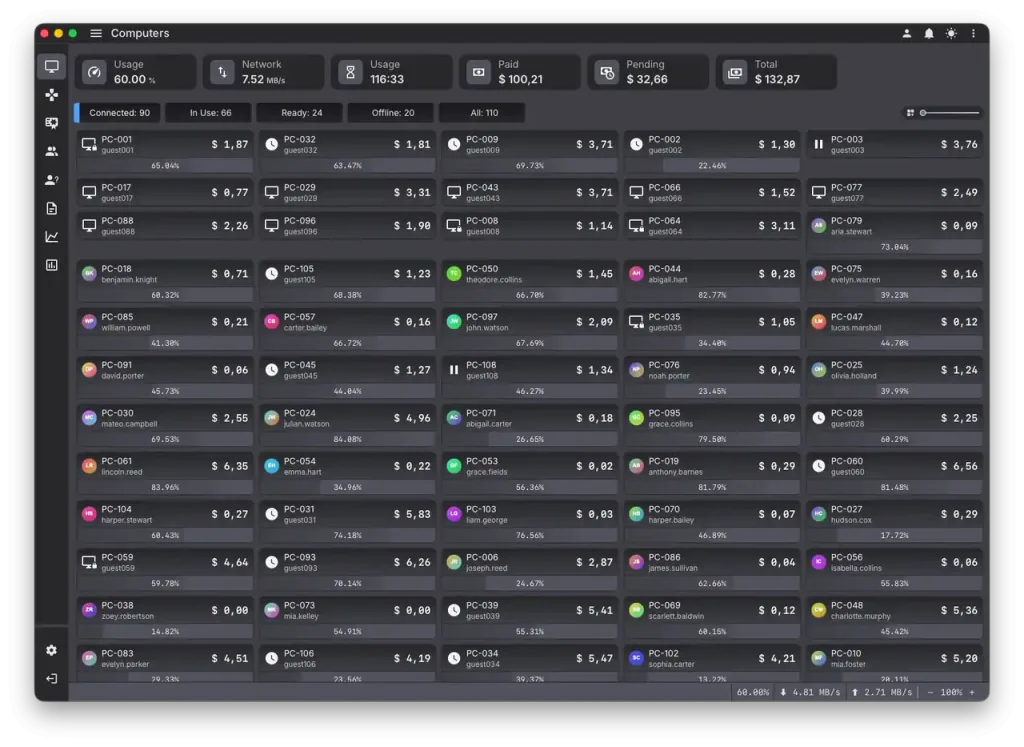
What HandyCafe Genesis is
HandyCafe first appeared around the year 2000 as free Windows software for internet cafes, with a server on the counter PC and a client program on each workstation. Genesis is presented as a fresh build rather than a point update, arriving roughly 25 years after that original release. It carries an open beta label, which means the software is public but still under active development and not yet marked stable. Older HandyCafe versions kept every control on the counter PC. Running a venue from the cloud and from a phone would be the clearest break from how the product has worked for two decades. That is the part worth testing first.
One detail stands out even at first glance: Genesis is built in Rust. Rust is a modern systems language known for catching whole classes of memory and crash bugs at compile time, the kind that used to slip into long-running Windows software written in older toolchains. For billing software that has to stay up through a full shift without leaking memory or freezing a client, that choice is a reasonable early signal of care. It is only a signal. A sound language does not replace real testing. The beta still has to earn trust on a live floor.
This review is written from the details HandyCafe has shared about Genesis so far and from early notes posted by open beta testers, not from hands-on use in a live venue. Beta feedback can change from one build to the next. Treat the points below as a starting checklist rather than final verdicts. A hands-on test is planned here as soon as the stable release ships.
Where HandyCafe Genesis fits
- Existing HandyCafe venues that want to preview the new build before a stable release is announced.
- Gaming lounges and esports venues that want cloud oversight, member accounts, and mobile control in one system.
- Large and multi-room floors watching the roadmap, since the promised scale features are not in the stable release yet.
- Operators who want to run and watch the floor from a phone rather than the counter PC.
- Owners comfortable testing pre-release software on a spare machine away from the live floor.
Gaming and esports focus
Genesis is aimed at gaming and esports venues rather than plain browsing cafes. That shows in the direction of the feature list. Member accounts, cloud oversight, and mobile control are the tools a busy gaming lounge or an esports arena leans on more than a small print-and-browse shop does. The scale claim is the part to watch. On paper the same cloud and mobile design that suits a twenty-seat room could also run a large floor, and even a very large multi-room venue, from a single dashboard. Whether it holds at that size depends entirely on features that are still promised rather than shipped. A room with hundreds of seats stresses billing, reporting, and client control in ways a beta has not yet had to survive. The fair read today is that Genesis points at large esports operations. It still has to reach a stable release, with those features working, before anyone should trust it with one.
What mobile management usually means
Mobile management is one of the headline reasons to look at Genesis. It helps to be specific about what the phrase usually covers on a cafe platform. In practice it tends to mean a phone or tablet app that mirrors part of the counter dashboard: seeing which PCs are busy, free, or locked, starting and stopping sessions, adding time, and clearing a top-up without walking to the desk. Some platforms also push an alert when a session ends or a client drops off the network. The value is easy to see for a single operator covering the floor alone. The dependence is just as real, because a phone that drives live sessions needs a steady connection and a clear fallback for the moment the network or the device fails.
Cloud access and remote control
A cloud dashboard is the other change that separates Genesis from the local-only versions before it. Classic HandyCafe kept its data on the counter PC. An owner had to be on site to read what the floor was doing. A cloud layer would let the same figures reach a browser or the mobile app from anywhere with a connection, which is what makes remote oversight and multi-branch reporting possible. It also shifts where the data lives. An operator moving from a local database to a hosted one should ask who holds the records, how often they are backed up, and what happens to daily billing if the internet link drops during a busy shift. Beta testers are a useful source here, since cloud reliability shows up in real use long before it shows up in a feature list.
Mobile member accounts
Mobile member management points at the customer side rather than the staff side. Most often it covers letting a regular hold an account, keep a prepaid balance, and log in at a workstation without a one-time code from the desk. A mobile version may go further and let customers register themselves, check remaining time, or top up before they arrive. For the operator, member records raise questions that an anonymous timecode never did. Where those records live, how logins are protected, and how unused balances expire all deserve a close look before real customer details go into a beta.
Testing an open beta safely
An open beta is public. Public is not the same as finished. Session data, billing totals, and member balances are the records a cafe cannot afford to lose to an early bug. A few precautions matter more here than they would with a settled release.
- Keep the current billing setup running as the system of record for as long as Genesis wears the beta label.
- Install the beta on a spare PC or one quiet station rather than the whole floor at once.
- Back up the existing database, license, and configuration before adding anything new.
- Test a session start, a session end, and a sample top-up before trusting the totals.
- Watch for lost time, wrong charges, or a client that fails to lock when a session ends.
Core features to evaluate
- Time billing rules, prepaid codes, member balances, and how unused time expires.
- Cloud dashboard access from a browser and from the mobile app.
- Mobile management for starting, pausing, and ending sessions away from the counter.
- Client lock screen behavior once a session ends or a workstation reboots.
- Report totals for time sales, refunds, and end-of-shift cash.
Security questions for mobile control
Putting session control and member logins on a phone widens a security surface that older HandyCafe never had. A counter-only tool was guarded mostly by the counter itself. A cloud and mobile setup reaches the same controls from anywhere the network allows, which is convenient for staff and worth checking with care. Reasonable things to confirm are whether the connection is encrypted, whether a lost phone can be locked out quickly, and whether actions taken remotely land in the same log as actions taken at the desk. Traceability counts for most when more than one person can start, extend, or void a session.
Questions before choosing HandyCafe Genesis
- Is the open beta stable enough to run through busy hours without losing session data?
- Do the promised features scale to a large or very large esports floor, not just a small room?
- How is the cloud and mobile connection secured when staff manage the venue remotely?
- Will member records and settings carry over cleanly once the stable version ships?
- What is the licensing plan once the open beta ends?