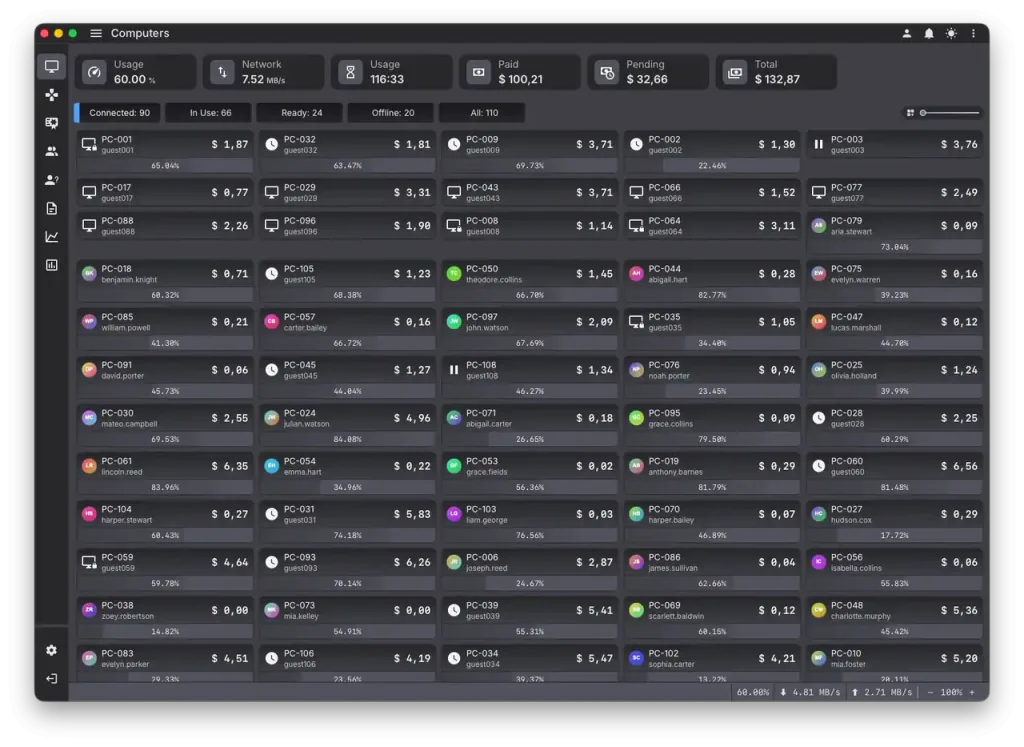
Why Genesis caught me off guard
I have set up HandyCafe more times than I can count, going back to the years when it was a free Windows tool with a server on the counter PC and a client on every station. So I opened HandyCafe Genesis expecting the same product under a newer skin. That expectation lasted about ten minutes. Genesis is not a face-lift. It is a full rebuild that happens to keep the name.
The first HandyCafe went out more than twenty years ago. Software with that much mileage usually coasts to a stop. It gets one last patch, then a farewell note on the download page. Genesis did the opposite. It came back as a ground-up rewrite. Almost nobody in this corner of the market saw the move coming. The classic HandyCafe guide still covers the older counter-only build for anyone running it today.
The team behind it is an American company now. That reads like a footnote until you have chased support across three time zones for a tool that changed hands twice. A clear owner steadies the licensing and the roadmap. It also means the invoice comes from a company you can actually name.
One detail set the tone before I started a single session. Genesis is written in Rust. In plain terms, that is the language you reach for when software has to run for weeks without leaking memory or freezing a client in the middle of a shift. Old billing tools used to drift after a few days of uptime. This one did not. I left it running for the better part of a week and came back to the same responsive dashboard I had closed the laptop on.
- A full Rust rebuild instead of another patch on a twenty-year-old codebase.
- A cloud dashboard that reaches the floor from any browser.
- A mobile app that runs sessions, not just a status readout.
- Remote desktop control that holds up like local playback.
- An American company behind the licensing, the roadmap, and the support.
Setup that took minutes
Installation is where old cafe software tends to punish you. Genesis did not. I pointed the server at the counter machine and ran the client installer on one station. The two found each other on their own. No config file to edit. No port to open by hand. The first station was live before my coffee went cold.
Adding the rest of the room was the same short loop each time. What used to be an afternoon of driver quirks and firewall exceptions turned into a background task I ran while doing something else. For anyone who has migrated a floor before, that alone is worth the look. The software got out of my way and let me finish.
Remote control that feels local
Remote management is the feature I went in most ready to doubt. Streaming a live desktop over the internet usually looks like exactly that: soft text, a laggy cursor, a full repaint every time you drag a window. Genesis does not look like that. I took control of a station from the far side of the building and it felt like scrubbing a 4K video file off the local disk. The cursor tracked my hand. Text stayed sharp. There was no rubber-band gap between a click and the thing I clicked.
So I pushed it on purpose. I opened a browser on the remote station, dragged windows around, and played a video clip on it while I still held control. The stream held its footing. At no point did it feel like a screenshot that refreshes once a second, which is the bar most remote tools clear and then trip over. This is the first time remote control on a cafe platform felt like something I would actually use every shift.
A cloud dashboard from anywhere
Classic HandyCafe kept everything on the counter PC. If you were not standing at the desk, you were guessing. Genesis moves the live view to the cloud. I read the same session grid and running totals from a browser at home that the staff had at the counter, client states and all. The numbers matched down to the second.
For a single room that is a convenience. For anyone running more than one branch it changes the whole job. You get one pane over every floor without a VPN, a chain of remote-desktop hops, or a spreadsheet somebody has to email at close. I have wanted this from cafe software for years. This is the first build where it felt designed in from the start rather than bolted on afterward. If you want to see how that compares across other platforms, the main internet cafe software guide sets the wider context.
Running the floor from a phone
The mobile app is not a trimmed-down status screen. It is the counter in your pocket. I started sessions from it. I added time to a station two rooms away. I cleared a top-up while standing in the doorway greeting a customer. Every action landed on the desktop dashboard at once. The reverse held just as well.
For a single operator covering a floor alone, this reshapes the shift. You are no longer chained to the desk to keep the room moving. You walk the floor and help customers. Billing stays on the phone in your hand. I kept reaching for it even when the counter PC was two steps away, which tells you how natural it felt.
Member accounts people actually use
Member accounts are where a lot of platforms wave their hands and hope. Genesis thought it through. A regular can hold an account, carry a prepaid balance, and sign in at any station without a one-time code from the desk. From the phone side, a customer can register, check the time they have left, and top up before they even walk in.
What sold me was the small stuff. Balances behaved. Logins were quick. A returning member sat down, signed in, and was playing while the person behind them at an older cafe down the street was still waiting for a printed code. That gap is the difference between a member system that merely exists and one that people reach for.
Security that was already on
Most cafe tools treat security as a setting you have to go find. Genesis had the important parts switched on out of the box. The link between client, server, and cloud was encrypted without me choosing it. A remote action and a desk action land in the same audit log. I could see who started, extended, or voided a session and from where.
Then I tried to trip it. I pulled a station off the network in the middle of a session to see what would happen. The client locked itself rather than opening up. That is the behavior you want and rarely get. When more than one person can touch a session, a single honest log that covers desk and phone alike is worth more than any headline feature on the box.
AI features that pull their weight
AI is the word that makes me brace, because it usually means a chatbot nobody asked for. Genesis uses it where it helps and stays quiet where it does not. It flagged a station whose session pattern looked off before a human at the desk would have noticed. It let me ask a plain-language question about the day's takings and returned the right report. None of it got in the way. That restraint is the tell of a team that built the feature for the floor rather than for a press release.
Support on the channel you already use
Support is where I expected the seams to show on a young build. They did not. You reach a person on whatever channel you already keep open: WhatsApp, Discord, email, or a button inside your own panel. I sent questions on two of those. Both came back the same day, from someone who clearly knew the product rather than a script.
Reaching help from inside the panel is the part I keep coming back to. When something is off at the counter, you are not hunting for a contact page. Help is one click from the screen where the trouble is. For a venue that cannot pause a busy Saturday to file a ticket, that detail earns its keep fast.
Where HandyCafe stands now
I went in skeptical. I came out convinced. HandyCafe Genesis is, by a wide margin, the best cafe and esports management software I have put my hands on right now. The size of the margin is the surprising part. This is not a slim lead that the next release from a rival erases in a quarter. It is a rebuild that solved several hard problems at once. Most of the field has not started on them.
There is more here than one review can hold. Each of these deserves its own close look. Each is getting one soon. For a more cautious, vendor-neutral take, the HandyCafe Genesis review of the open beta weighs the same build with a colder eye. If you are lining it up against another platform, the internet cafe software buyer checklist lists what to compare before you commit.
- Cloud reporting and totals across several branches from one dashboard.
- The AI tools for session anomalies and plain-language reporting.
- The mobile member flow from sign-up through top-up.
- Security and audit behavior once a full staff shares the panel.
- The licensing plan as the build moves toward a stable release.
Expect more on HandyCafe Genesis on this blog. A comeback this complete does not come along often. This one earned the coverage.